

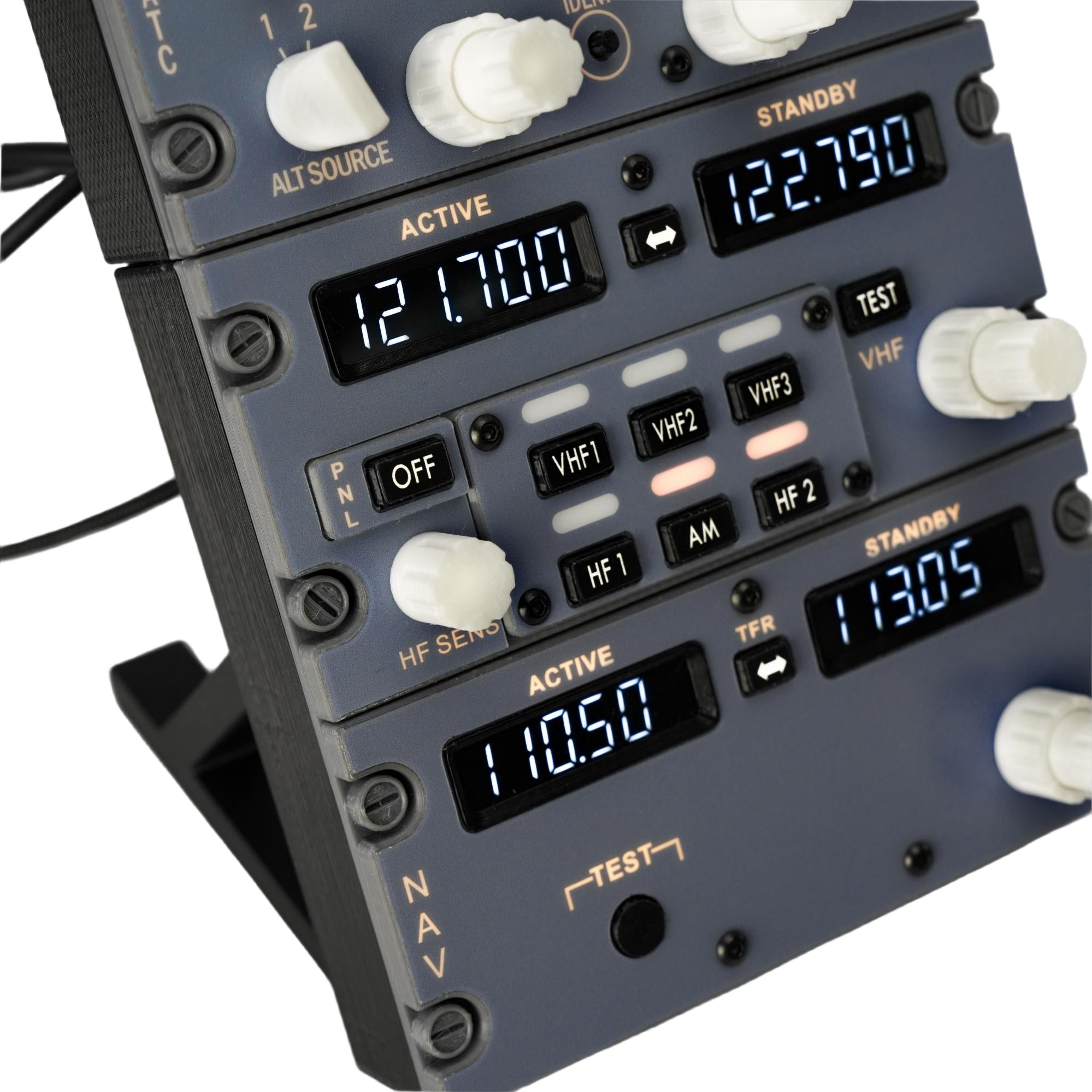
Building a realistic B737 cockpit — whether a full home cockpit or a desktop setup — comes with a long list of decisions. One of the most important is how you handle radio and transponder controls.
Clicking through virtual menus breaks immersion. Mixing mismatched panels from different brands creates clutter. And without the right gear, even a simple frequency change feels like a chore.
That's where the Hoowalt D201 and D203 come in.
Let's look at each panel individually — and then show you why they're even better together.

Hoowalt D201: B737 Radio Tuning Panel
The D201 is a 1:1 recreation of the B737 aircraft radio control layout. It's not "inspired by" — it follows the real cockpit arrangement.
What It Does
The D201 handles all your communication and navigation tuning:
- VHF, HF, and AM channel selection
- Active / Standby dual frequency display
- One-press TFR switching
- Mechanical knobs and push buttons — no hunting through on-screen menus
Key Features
- 1:1 cockpit layout – frequency tuning logic mirrors the real B737
- Physical controls – direct manipulation instead of mouse clicks
- MobiFlight support – flexible mapping for MSFS, X-Plane, and custom cockpits
- Desktop or DIY integration – angled stand included, but also ready for custom mounting
Compatibility
Works seamlessly with:
- MSFS2020 / MSFS2024
- X-Plane 12
- ZIBO737
- PMDG737

Hoowalt D203: B737 ATC Transponder Panel
The D203 brings the transponder control interface to your desktop — no more digging through virtual menus to squawk 7700.
What It Does
The D203 puts full transponder control at your fingertips:
- Clear digital code display – easy to read during flight
- Rotary knobs for fast code entry
- IDENT button for quick identification
- Labeled modes: XPONDR, ALT RPTG, STBY, TA ONLY, TA/RA
Key Features
- Realistic ATC transponder design – modeled after actual flight deck panels
- Enhanced immersion – hands-on interaction for transponder and TCAS modes
- Compact angled stand – angled for better visibility, compact enough to fit alongside other gear
Compatibility
Same great compatibility:
- MSFS2020 / MSFS2024
- X-Plane 12
- ZIBO737
- PMDG737

Why Buy Them Together? Seamless Integration.
The D201 (radio panel) and D203 (transponder panel) are designed to work side by side — both physically and functionally.
What You Get When You Bundle
Order both the D201 and D203 together, and Hoowalt includes a free mounting bracket that integrates both panels into a single, unified unit.
The bracket holds both panels at the same height and angle, so they look and feel like one seamless piece of cockpit equipment — exactly how Boeing intended.
Functional Integration
In the Home B737 flight deck, the radio tuning panel and transponder control unit sit right next to each other. You tune your frequencies on the D201, then glance over to set your squawk code on the D203. Everything is within reach. Everything flows naturally.
That's the experience the D201 + D203 bundle delivers.

Who Is This Bundle For?
This is for sim pilots who:
- Fly the ZIBO737 or PMDG737 seriously
- Are tired of clicking virtual radio panels with a mouse
- Want a clean, integrated desktop cockpit without building a full enclosure
- Appreciate 1:1 scale and realistic control logic

The Bottom Line
The Hoowalt D201 gives you 1:1 B737 radio tuning with physical knobs and dual frequency display. The Hoowalt D203 puts full transponder and TCAS control at your fingertips.
And when you buy them together, Hoowalt includes a free mounting bracket that turns two separate panels into one clean, integrated unit — exactly where they belong in your cockpit.
Hoowalt: Pro Flight Sim Peripherals | Ultimate Cockpit Control


